A JavaScript Memory Leak. Really…

Hi, JS devs! A video from Theo got me thinking about a question I'd overlooked: after I stop a timer, what still holds on to the memory its callback used?
Calling clearInterval() feels like the end of the job. But stopping the work and releasing the references are two different things. I want to walk through the example that made that distinction click for me.
JavaScript's garbage collector can reclaim memory that is no longer reachable. It doesn't know when I'm finished using an object. If a timer, listener, or closure still keeps that object reachable, it can stay alive after the work is done.
By Sourabh Malviya.
What I took away
- Stopping work and releasing references are separate parts of cleanup.
- Closures are useful, but a long-lived closure can retain more state than we expect.
- A retaining path in a heap snapshot is better evidence than a high memory number alone.
The example that made me stop and think
Let's start with a timer that closes over a large buffer:
function allocMemory() {
  const buffer = new ArrayBuffer(100_000_000); // 100 MB, about 95.4 MiB

  const intervalId = setInterval(() => {
    console.log(buffer.byteLength);
  }, 1000);

  return () => {
    clearInterval(intervalId);
  };
}

const releaseMemory = allocMemory();
releaseMemory();
While the interval is active, its callback needs buffer. Keeping that memory alive is expected. Calling releaseMemory() stops the interval, but it doesn't mean the buffer is collected immediately.
The subtle part is the returned function. It explicitly uses intervalId, while the interval callback uses buffer. Depending on the engine and how it represents their shared lexical environment, retaining one closure can also keep other state from that environment reachable. The V8 team's explanation of shared closure environments describes this kind of retention.
I'd investigate the retaining path before calling this a leak. The example doesn't prove that every JavaScript engine keeps the buffer forever; runtime version, optimization, and debugger state can affect the result.
Garbage collection follows references
An object becomes eligible for collection when there is no reachable path to it. Going out of a function's local scope is not enough if another function still needs its state.
The mark-and-sweep model helped me understand this:
- Start from roots, such as reachable global state and active execution state.
- Follow references to mark objects that remain reachable.
- Reclaim unreachable objects when collection runs.
Real engines do more than this simplified picture. V8 also uses generations and other optimizations. We don't need to predict every collection step to diagnose a leak; we need to find what keeps the unwanted object reachable. MDN's memory-management guide explains that distinction.
This also corrects an easy misunderstanding about managed languages: we don't manually free every heap object in JavaScript. The runtime handles collection. Our responsibility is to stop retaining objects we no longer need.
What the closures keep alive
A closure is a function together with access to its surrounding lexical environment. That access can outlive the call that created it.
For the active timer, I can follow this path:
Active timer → callback → captured bufferThen I'd inspect the environment captured by the returned cleanup function:
Caller → releaseMemory → closure environmentThe second path is the one that surprised me. Reading the cleanup function's body alone doesn't tell me how the engine stores its environment. I need the actual retaining path to establish what stays alive; I can't assume every outer variable is retained.
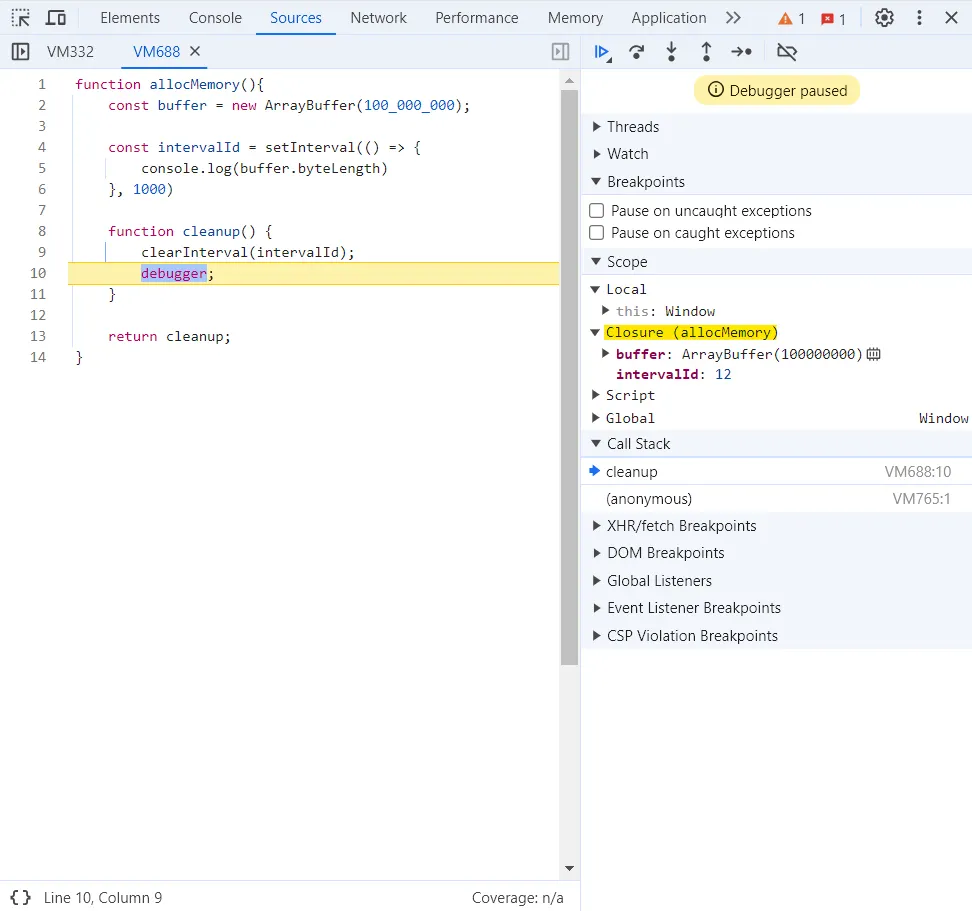
This screenshot is from the original investigation. Treat it as a debugging reference, rather than a benchmark for every browser or Node.js release.
Make cleanup release the buffer too
In this example, I can make ownership explicit: stop the interval and remove this closure environment's reference to the buffer.
function allocMemory() {
  let buffer = new ArrayBuffer(100_000_000);

  const intervalId = setInterval(() => {
    if (buffer !== null) {
      console.log(buffer.byteLength);
    }
  }, 1000);

  return () => {
    clearInterval(intervalId);
    buffer = null;
  };
}

let releaseMemory = allocMemory();
releaseMemory();
releaseMemory = null;The returned function is safe to call more than once. Assigning buffer = null removes that reference; dropping releaseMemory also removes the caller's reference to the cleanup function when it's no longer needed.
I wouldn't expect either assignment to force collection or make process memory fall immediately. I've removed these references, but another part of the program could still hold the buffer. That's why I'd verify the result with a snapshot.
That doesn't make = null a rule for every local variable. The useful question is whether a long-lived owner still holds something whose work is finished. The same ownership question comes up with cleanup around Spring AI calls, although those examples manage a different kind of resource.
How I'd verify a JavaScript memory leak
I'd compare the same workload before and after cleanup:
- Take a baseline heap snapshot.
- Create and clean up several instances of the suspected object.
- Take another snapshot after giving the runtime an opportunity to collect.
- Inspect surviving objects and their retaining paths.
- Repeat the workload to distinguish ongoing accumulation from a one-time allocation.
Chrome DevTools' heap-snapshot guide explains the comparison and retainers views. Be careful with the investigation itself: objects inspected or logged through DevTools can remain reachable because of the console. A paused debugger is another reason to repeat the check without debugging state attached.
For Node.js, this buffer example needs more than heapUsed:
const { heapUsed, external, arrayBuffers, rss } = process.memoryUsage();
console.table({ heapUsed, external, arrayBuffers, rss });
I read these values in bytes, keeping their scopes separate. arrayBuffers includes ArrayBuffer backing memory and is already included in external, so adding them would double-count that memory. rss measures resident process memory; a high value alone wouldn't convince me there's a JavaScript leak. The Node.js process documentation defines each field.
My key takeaway
I've been writing code in different languages for quite a while, and I still find cases that make me revisit something I thought I understood. This was one of them.
Garbage collection doesn't remove the need to think about lifetimes. For a timer, listener, subscription, or cache, I want to know who owns it, when its work ends, and which references remain afterward. Then I can check that expectation with a snapshot.
That's all for now. Feel free to correct me if I've gotten anything wrong!